Few things are as frustrating as settling in for the evening, only to find your DSTV remote not working when you press the power or channel buttons. The good news is that most remote faults are simple to diagnose at home, and the majority come down to batteries, pairing, or a line-of-sight problem rather than a broken decoder. This guide walks you through the fixes we use most often on call-outs across Franschhoek and the Cape Winelands.
Start with the batteries
It sounds obvious, but weak or dead batteries are behind the vast majority of remote complaints. A remote can still light up faintly or work intermittently while the batteries are on their way out, which makes the fault feel more serious than it is.
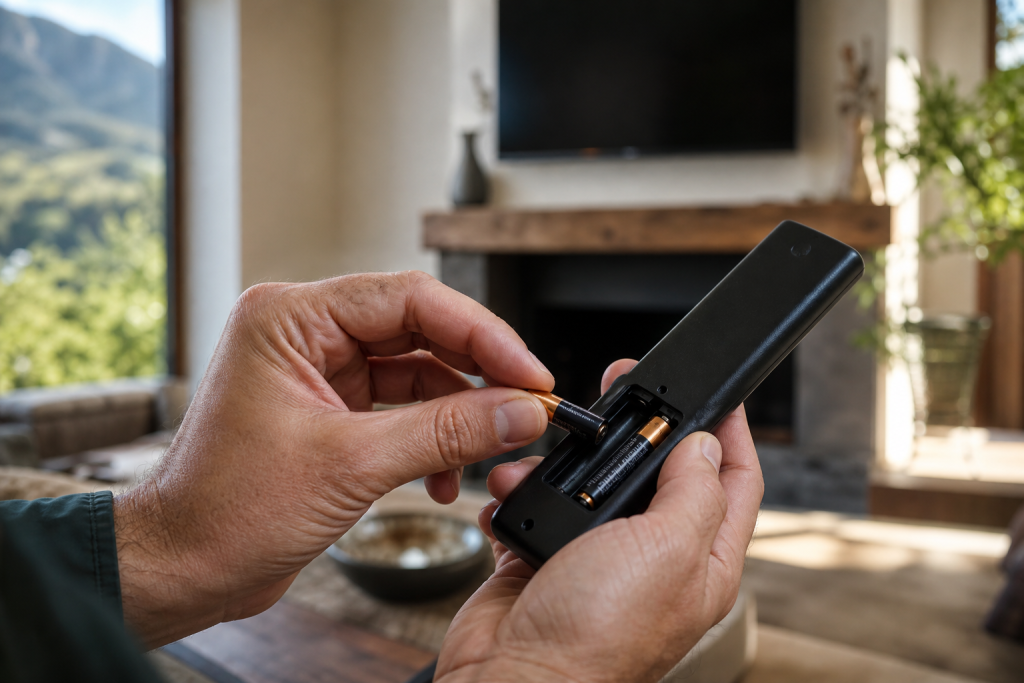
- Open the battery compartment and fit two fresh AAA batteries, matching the + and – markings.
- Avoid mixing an old battery with a new one: always replace both together.
- Wipe the metal contacts with a dry cloth if you see any corrosion or greenish residue.
After swapping the batteries, wait a few seconds and test a basic button like volume. If the decoder responds, you are done.
Understand RF vs IR remotes
DSTV uses two very different remote technologies, and knowing which one you have changes how you troubleshoot.
Infrared (IR) remotes
Older HD decoders and many standard models use infrared. IR needs a clear line of sight to the small dark IR eye on the front of the decoder. If something is blocking that eye: a soundbar, a vase, a media cabinet door, the remote simply won’t reach it.
Radio frequency (RF) remotes
The DSTV Explora typically ships with an RF remote, which uses radio signals and does not need line of sight. That means it can work through cabinet doors and from another angle in the room, but it does need to be correctly paired to the Explora to function.
Re-pair the remote to your Explora or decoder
If the batteries are fresh but the remote still won’t control the decoder, re-pairing usually solves it. The exact steps vary slightly by model, but the general process for an Explora RF remote is:
- Press and hold the Back and TV buttons together until the remote’s light flashes, indicating it is in pairing mode.
- On the decoder’s front panel or on-screen menu, follow the prompt to detect a new remote.
- Wait for the confirmation that pairing is complete, then test the channel buttons.
If your on-screen menu offers a “remote pairing” or “remote setup” option under settings, use that guided flow: it walks you through the button combination for your specific box. When a fresh installation or a decoder swap leaves the remote unresponsive, a clean decoder setup by a technician gets everything paired and talking correctly.
Use the DSTV app as a backup remote
Here is a trick many customers don’t know: the DSTV app can act as a virtual remote. If your physical remote has failed and you need to keep watching tonight, install the app on your phone, sign in with your DSTV details, and use its remote-control feature to change channels and navigate menus while you sort out the hardware. It is a genuine lifesaver during load-shedding evenings when the shops are shut.
Testing whether the remote or the IR eye is faulty
If nothing above works, you need to figure out whether the fault is in the remote or in the decoder’s receiver. A quick phone-camera test checks an IR remote in seconds:
- Open your phone’s camera and point the front of the remote at the lens.
- Press any button and watch the screen: a working IR remote shows a faint purple or white flash from the emitter.
- No flash on any button usually means the remote itself has failed.
Note that this test does not work for pure RF remotes, since they emit no infrared light. If the remote flashes correctly but the decoder still ignores it, the fault may lie with the decoder’s IR eye or internal receiver, which is a repair job rather than a remote replacement. Persistent unresponsiveness, especially combined with picture or signal glitches, is worth having checked as part of a broader DSTV signal repairs assessment.
When to call a professional
Try the home fixes first: batteries, line of sight, re-pairing, and the app. Call in a technician when:
- A new remote won’t pair no matter what you try.
- The phone-camera test shows the remote emitting, but the decoder ignores every button.
- The decoder’s front-panel buttons also fail to respond, pointing to a board-level fault.
- You have an Explora and want it professionally reconfigured: our DSTV Explora installation service covers pairing and setup end to end.
If you are weighing up a hardware upgrade while you are at it, our comparison of the Explora versus the older HD decoder explains which remote and features come with each.
Still stuck with a dead remote? The friendly team of DSTV installers in Franschhoek can help. Call or WhatsApp 079 754 5527 or head to our contact page: we offer same-day service across Franschhoek and the Winelands and will have you back to your favourite channels in no time.
Related troubleshooting guides
- DSTV Decoder Won’t Turn On or Stuck on Standby: Fixes
- DSTV Smartcard Error (E141-4): What It Means and How to Fix It
Related DSTV Troubleshooting Guides
If the remote is fine and the picture still is not, the fault is further up the chain. Our DStv repair service in Franschhoek covers signal loss, error codes and weather-related dropouts.
Need a DSTV technician?
Same-day DSTV installation, signal repair and Explora setup across Franschhoek and the Cape Winelands.