You press the power button and… nothing. A DSTV decoder won’t turn on is one of the most common calls we get in Franschhoek, and while a dead decoder feels alarming, the cause is often a power issue you can fix yourself in a few minutes. This guide takes you through the checks step by step, from the wall socket to the power supply, so you know exactly what to try before booking a technician.
Check the power source first
Before assuming the decoder is broken, rule out everything upstream of it. In the Winelands, where load-shedding and surges are part of daily life, power problems are the number-one culprit.
- Confirm the wall socket is switched on and actually live: plug in a phone charger or lamp to test it.
- Check that you are not in a load-shedding slot; the decoder will look dead if the whole circuit is off.
- Inspect the power cable for damage, and make sure the plug is pushed firmly into both the socket and the back of the decoder.
- If the decoder is on a multiplug or surge protector, test it directly in a wall socket instead.
A surprising number of “dead” decoders come back to life the moment a loose plug or a tripped multiplug switch is corrected.
Read the standby light
The small light on the front panel tells you a lot about what the decoder is doing.
Red standby light
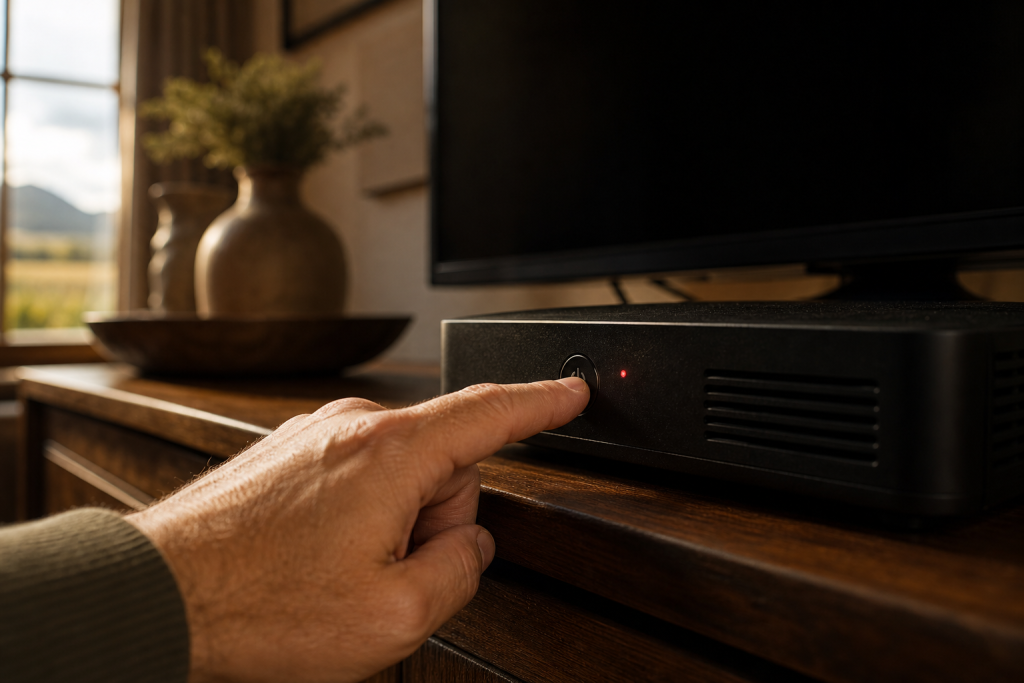
A steady red light usually means the decoder has power but is in standby. Simply press the power button on the decoder itself (not just the remote) and it should switch to green and boot up. If only the remote fails to wake it, the issue may be your remote rather than the decoder.
No light at all
If there is no light whatsoever, the decoder is not receiving power. That points back to the socket, cable, or the internal power supply rather than a settings problem.
Stuck on standby or flickering
A decoder that shows a red light but refuses to boot to green, or one that flickers and cuts out, often has a struggling power supply or needs a hard reset: covered below.
Do a hard reset
A hard reset clears temporary glitches that can leave a decoder frozen on standby. It is safe to do and does not affect your subscription.
- Switch the decoder off at the wall and unplug it completely.
- Leave it unplugged for at least 60 seconds: this lets the internal power fully drain.
- Plug it back in, switch the socket on, and press the power button on the front panel.
- Give it a minute or two to boot; the Explora in particular can take a little while to load.
If it boots normally after this, you have likely cleared a one-off software hang. If it still won’t start, move on to the heat and hardware checks.
Check for overheating
Decoders, and the Explora especially, run warm and need airflow. When they overheat they can shut down, refuse to power on, or cut out repeatedly.
- Feel the top of the unit: if it is very hot, switch it off and let it cool for 20–30 minutes.
- Make sure it is not enclosed in a tight cabinet, stacked under other equipment, or covered by items that block the vents.
- Clear dust from the ventilation slots with a dry brush or a burst of compressed air.
- Give it space to breathe, then try powering on again.
Chronic overheating shortens the life of the internal components, so improving ventilation now can prevent a bigger fault later. If your box repeatedly overheats after a hot Franschhoek afternoon, it is worth a professional look during a decoder setup and health check.
When the power supply has failed
If you have confirmed the socket is live, tried a different cable, done a hard reset, and ruled out heat, yet the decoder still shows no life: the internal power supply unit has most likely failed. This is a common fault as decoders age, and it is not something to attempt yourself: it involves opening the sealed unit and working with components that hold residual charge.
A failed power supply is usually a straightforward, economical repair for a qualified technician, and it is often far cheaper than replacing the whole decoder. Our team handles these repairs as part of our DSTV signal repairs service, testing the board and replacing faulty components properly.
When to call a professional
Work through the home checks first, then call a technician if:
- The socket is live and the cable is good, but the decoder shows no light at all.
- It powers on then shuts off repeatedly, even after cooling and a hard reset.
- You smell burning or hear buzzing from the unit: unplug it immediately and stop using it.
- You would rather upgrade than repair: our DSTV Explora installation team can advise, and our Explora vs HD decoder guide helps you choose.
Don’t sit in the dark wondering what’s wrong. The DSTV installers in Franschhoek are ready to help: call or WhatsApp 079 754 5527, or reach us through the contact page. We offer same-day service across Franschhoek and the Cape Winelands and will get your decoder powered up again fast.
Related troubleshooting guides
- DSTV Remote Not Working? How to Re-Pair and Fix It
- DSTV Smartcard Error (E141-4): What It Means and How to Fix It
- DSTV Error 51: Why It Happens and How to Clear It
Related DSTV Troubleshooting Guides
Need a DSTV technician?
Same-day DSTV installation, signal repair and Explora setup across Franschhoek and the Cape Winelands.